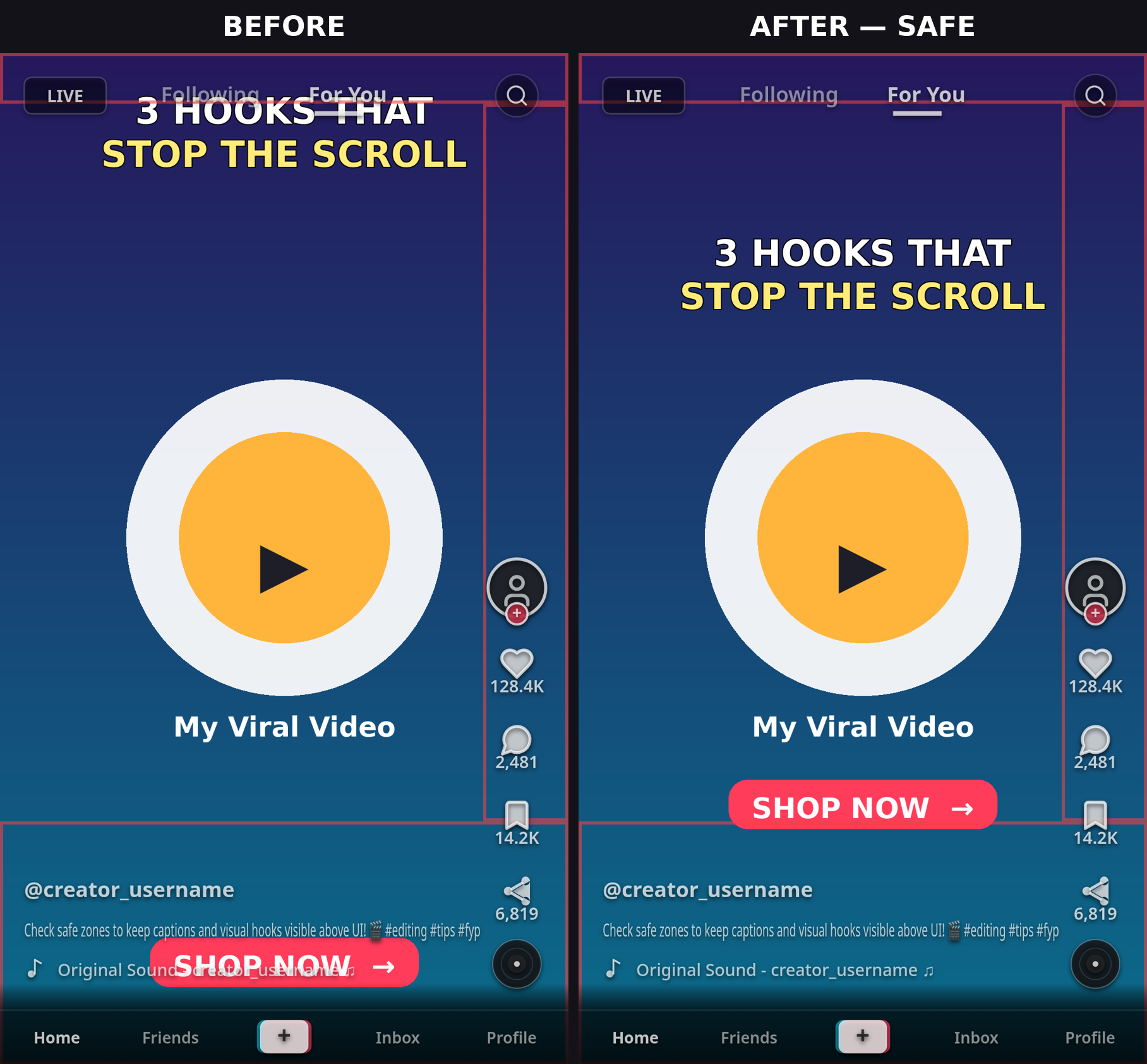
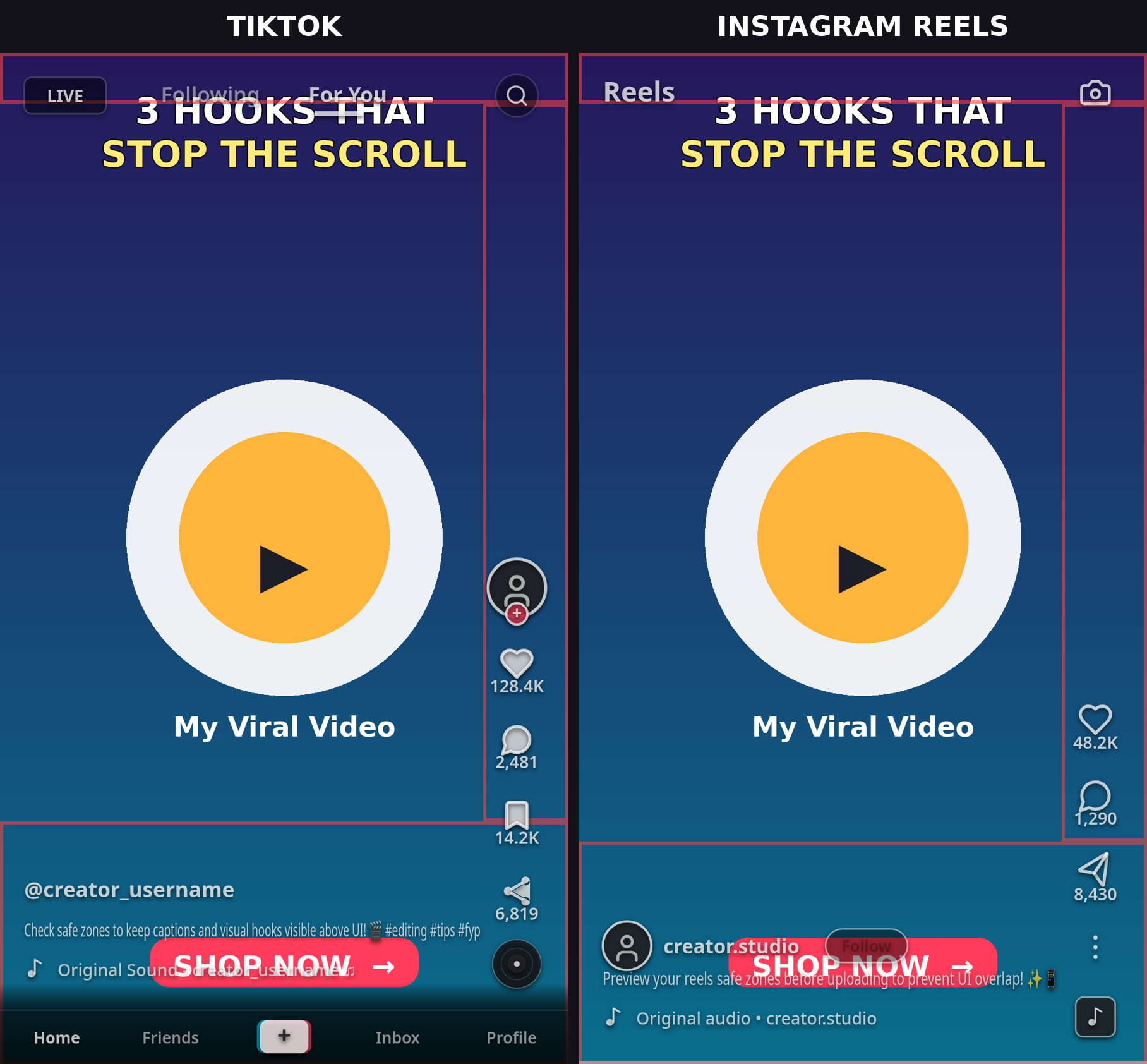
TikTok Safe Zone Dimensions 2026 (1080×1920): The Complete Guide
If you've ever watched your TikTok come back with half the caption hidden behind the like button, you've run into the TikTok safe zone problem. TikTok draws its interface — like/comment/share buttons, caption bar, search tabs — directly on top of your video. Anything you place under those UI elements gets partially or fully covered, and no amount of editing after posting will fix it.
This guide gives you the 2026 TikTok safe zone dimensions for a standard 1080×1920 (9:16) video: the exact top, bottom, left, and right margins to keep clear, where to place hooks, subtitles, and CTAs, and how the safe zone changes for TikTok ads. TikTok doesn't publish official pixel margins for organic content — the values below are conservative working values measured from the current app (verified October 2026), so they hold on any phone.
Quick check: if you'd rather verify than measure, run your frame through ReelGuard's free TikTok safe zone checker — it overlays the current UI zones on your footage in your browser. Nothing is uploaded; everything runs locally.
The TikTok Safe Zone in 2026: Pixel Margins at a Glance
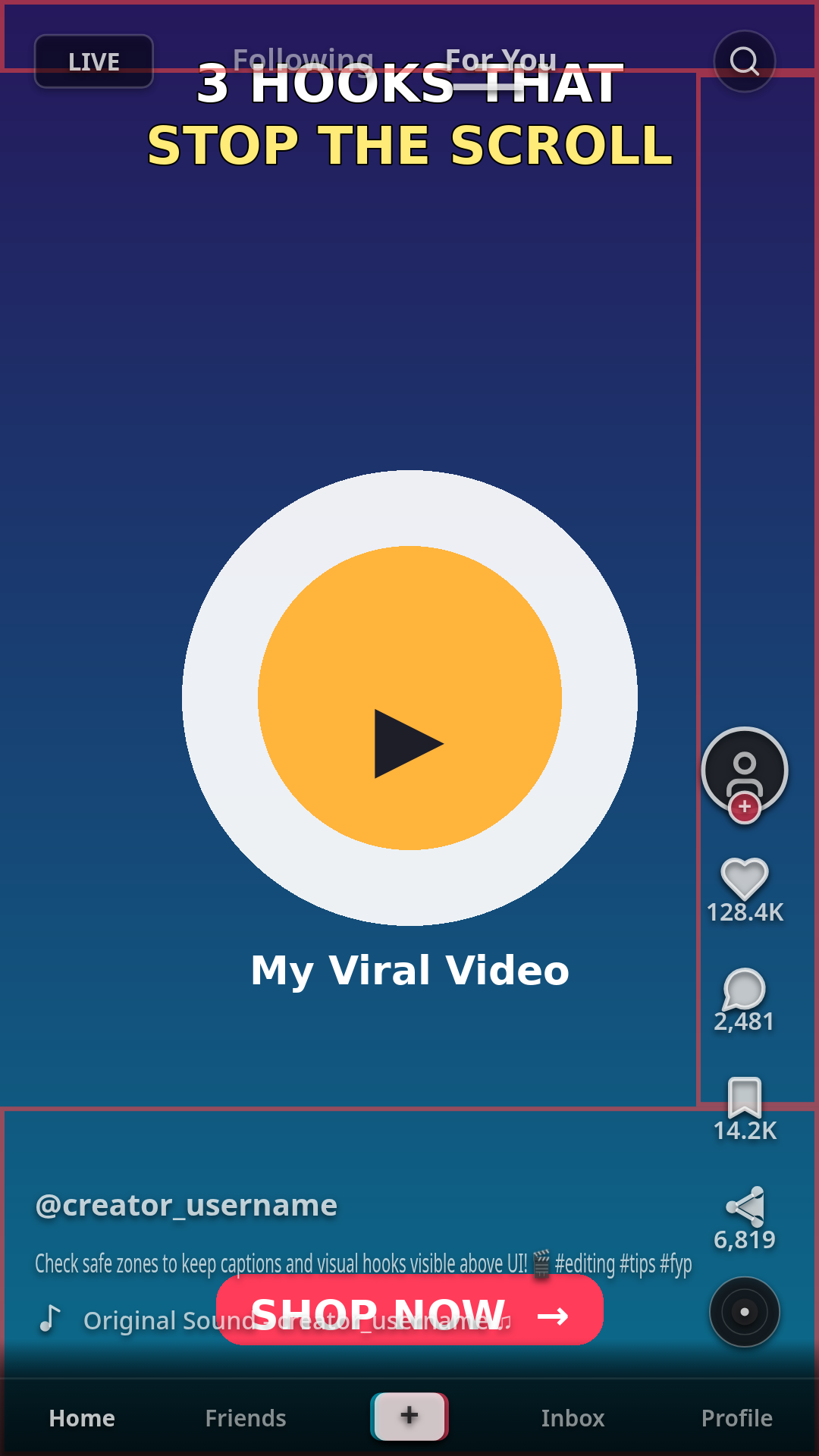
On a 1080×1920 px TikTok video, keep critical content — text, faces, logos, CTAs — clear of these zones:
| Edge | Keep clear | What covers it |
|---|---|---|
| Top | ~130–150 px | "Following" / "For You" tabs, search icon, LIVE badge, phone notch/status bar |
| Bottom | ~320–480 px | Username, caption (2–3 lines), sound name, follow button, shop links |
| Right | ~140–160 px | Profile avatar, Like, Comment, Save, Share buttons, spinning sound disc |
| Left | ~60 px | Nothing fixed — but keep a small buffer for caption overflow |
Resulting safe area: roughly 860–880 px wide × 1290–1380 px tall, centered in the frame. Anything inside this box stays visible on every phone, whether the viewer has a short caption or a long one.
Why a range? The bottom margin moves the most: a two-line caption fits inside ~320–350 px, but a caption with hashtags and a "see more" link can climb to ~480 px. Use the conservative end (480 px) when your captions are long.
Why TikTok Doesn't Publish Exact Numbers (and Why Ranges Beat Precision)
Unlike its ad templates, TikTok has never published official pixel margins for organic videos. The UI shifts slightly between phone models and app updates — taller phones crop a few dozen pixels off each side, and long captions physically grow upward over your video. That's why honest guides give you conservative working values instead of fake precision like "exactly 142 px." A margin that holds on the most crowded screen holds everywhere.
Rule of thumb: design for the worst screen, not the average one.
Where to Put Text, Faces, and CTAs on TikTok
Hook text — the first thing viewers read — belongs in the upper-middle band of the safe area, roughly 150–500 px from the top. It sits below the tabs, above the action buttons, and survives even when the caption expands.
Burned-in subtitles should end their lowest line above ~1700 px from the top (i.e., inside the safe area) and each line should end before ~860 px across, so lines stay clear of both the caption bar and the right-hand button column.
Faces and key product shots belong center or center-left, never in the bottom-right corner — that's the most crowded part of the screen (buttons above, caption below).
CTAs ("link in bio", promo codes) go center or center-left of the safe area. Avoid the bottom-right entirely.
Organic vs. TikTok Ads Safe Zone
If you ever promote a post, know the safe zone shrinks: TikTok's ad UI adds a CTA button ("Shop Now", "Learn More") and a "Sponsored" label, which push the bottom margin to ~370 px or more. TopView and Shop placements shrink it further (product cards take another ~80–100 px at the bottom). Always re-check promoted creative separately — a layout that's safe for organic can be covered once the ad layer appears.
5 Mistakes That Get TikTok Text Covered
- Captions in the bottom third. The caption bar covers it 100% of the time.
- Logos under the right rail. Like/comment/share sit in a fixed vertical strip on the right.
- Centered lower-third titles. They collide with the username and caption text.
- Tiny text near the edges. Taller phones crop ~50 px off each side; text there gets clipped or sits under rounded screen corners.
- Checking only on your own phone. Your view shows extra elements viewers never see (liker avatars down the left edge, Promote/Privacy bar) — so "looks fine on my phone" is not a real check.
How to Check Your TikTok in 30 Seconds (Free)
- Open ReelGuard and select TikTok.
- Drop in a frame of your video or a thumbnail.
- If any text, face, or logo falls in the shaded zone, move it and check again. Repeat for Reels and Shorts if you crosspost.
The whole thing runs in your browser — your footage never uploads anywhere.
What About Reels and Shorts?
The same video checked for TikTok is not automatically safe on Instagram Reels or YouTube Shorts. Reels reserves more space at the top and crops to 4:5 in the feed; Shorts has wider top/bottom margins for titles and the subscribe button. If you crosspost, check all three — ReelGuard's platform toggle shows each one side by side. (Detailed guides: Instagram Reels safe zone dimensions 2026 · YouTube Shorts safe zone dimensions 2026 — publish these next.)
FAQ
What are the TikTok safe zone dimensions in 2026? On a 1080×1920 video, keep ~130–150 px clear at the top, ~320–480 px at the bottom, ~140–160 px on the right, and ~60 px on the left. The usable safe area is roughly 880 × 1310 px. TikTok publishes no official numbers for organic content, so these are conservative working values.
Why is my text cut off on TikTok? Your text is sitting under TikTok's UI — the caption bar at the bottom, the action button rail on the right, or the tabs at the top. Move on-screen text into the center safe area (~880 × 1310 px on a 1080×1920 frame) and keep burned-in subtitles above ~1700 px from the top.
Where should captions go on TikTok? Hook text in the upper-middle band (150–500 px from the top); burned-in subtitles in the middle of the frame, ending above the caption bar; CTAs center or center-left. Never the bottom-right corner.
Is the TikTok safe zone different for ads? Yes. Ad UI adds a CTA button and "Sponsored" label, pushing the bottom margin to ~370 px+, and TopView/Shop placements shrink it further. Re-check promoted creative separately.
How can I check my TikTok safe zone for free? Use ReelGuard's free safe zone checker: select TikTok, drop in a frame, and the tool overlays the current UI zones so you can see exactly what gets covered. It runs entirely in your browser — nothing uploads.