One Design Safe on TikTok, Reels & Shorts: 2026 Crosspost Safe Zone Guide
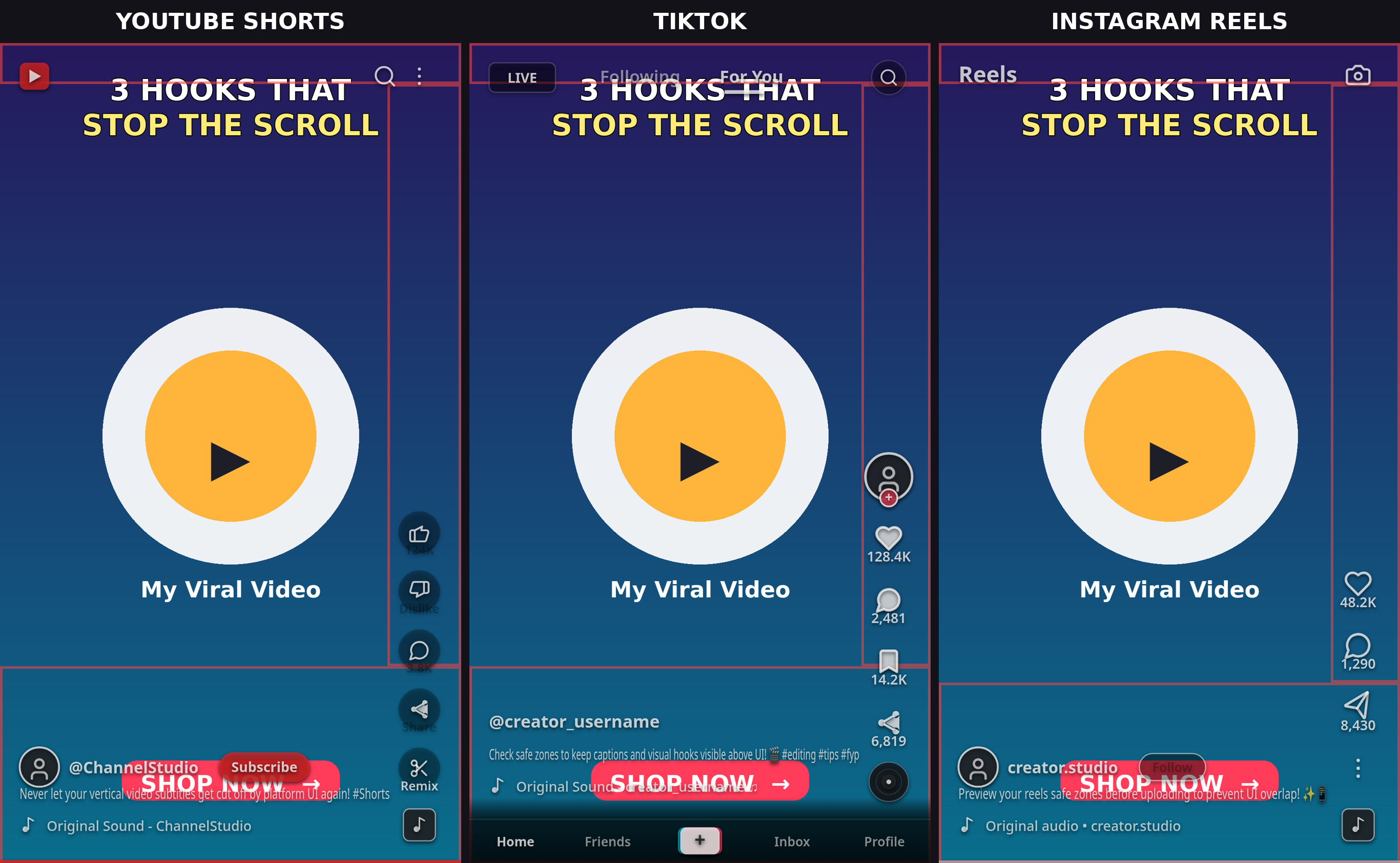
Crossposting the same vertical 9:16 video across TikTok, Instagram Reels, and YouTube Shorts is the most efficient workflow in digital content. But each platform draws completely different interactive controls over your video. A title that clears TikTok's right rail gets eaten by YouTube Shorts' subscribe button, and a call-to-action placed in the lower-third survives on Shorts but disappears behind Instagram's multi-line caption and 4:5 feed crop.
You don't need to export three separate versions of your video. By designing to the shared cross-platform safe box, you can create one single master video that stays 100% visible and unclipped everywhere.
Quick check: If you want to test your video across all three platforms right now, run your frame through ReelGuard's free safe zone checker. Toggle between TikTok, Reels, and Shorts in your browser to verify alignment instantly. 100% private — nothing is uploaded.
The Universal Safe Zone: Pixel Math at a Glance
On a standard 1080×1920 px (9:16) canvas, here is how the safe boundaries compare across all three networks:
| Edge | TikTok | Instagram Reels | YouTube Shorts | Shared Safe Box |
|---|---|---|---|---|
| Top | ~130–150 px | ~270 px (Meta spec) | ~180 px | Clear top ~270–390 px |
| Bottom | ~320–480 px | ~670 px (with 4:5 feed crop) | ~360–400 px | Clear bottom ~670 px |
| Right | ~140–160 px | ~65 px (~227 px corner) | ~150–160 px | Clear right ~160 px |
| Left | ~60 px | ~65 px | ~80 px | Clear left ~80 px |
The Universal Safe Box: Roughly X 80–920 px, Y 390–1230 px (an 840×840 px focal box centered in the upper-middle of the frame). When your core titles, kinetic captions, and call-to-action stay inside this area, your video renders cleanly on every network without clipping.
The Reels 4:5 Feed Crop: The Trap Most Crossposters Miss
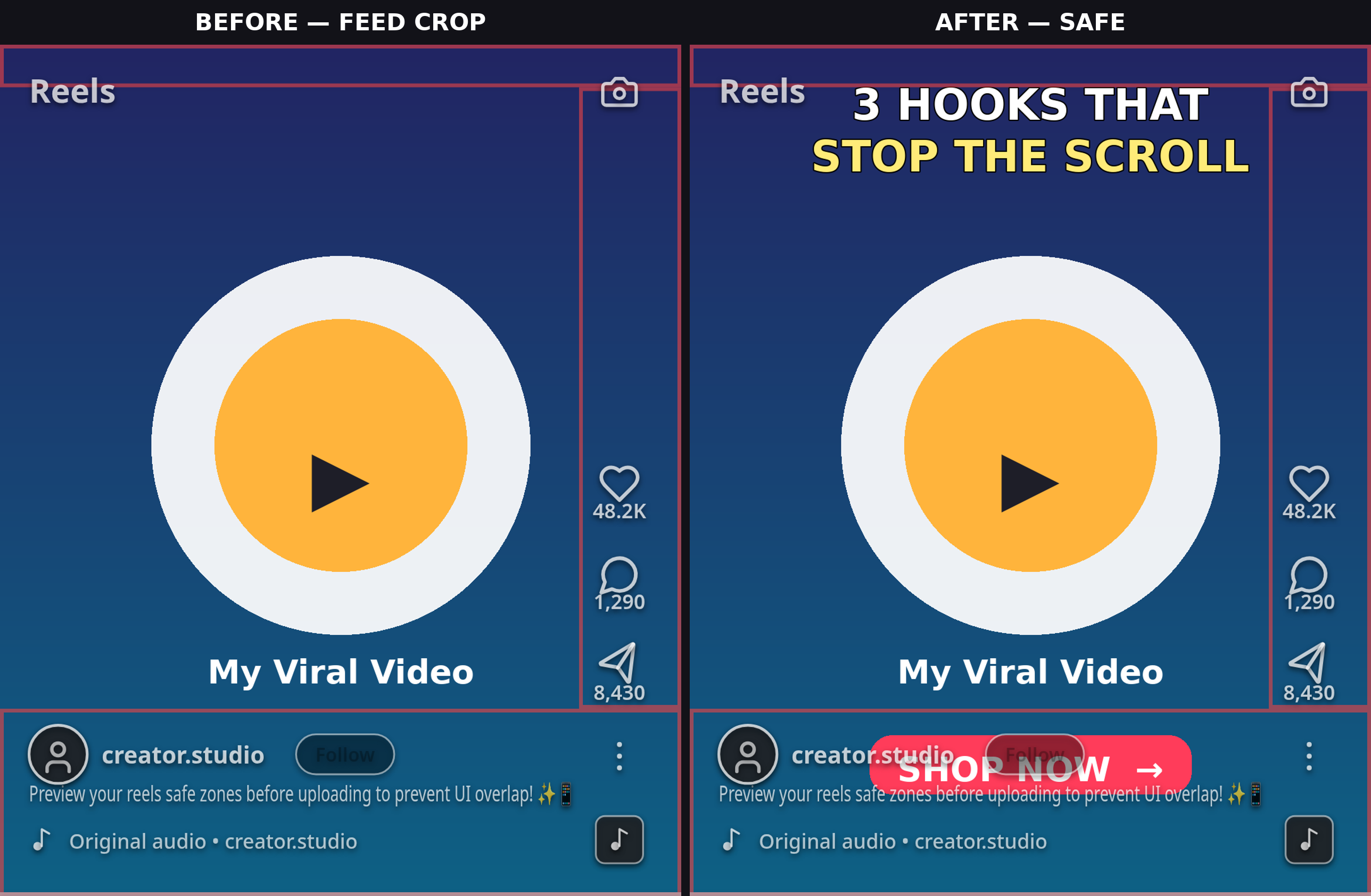
The biggest hidden trap in multi-platform publishing is Instagram's home feed crop. In the dedicated Reels viewer, your video plays in full 9:16 (1080×1920). But in the main Instagram feed, Instagram crops your video to 4:5 (1080×1350 px), cutting off 285 px from the top and 285 px from the bottom.
If your opening hook text is sitting above Y 285, viewers scrolling their Instagram feed will see it sliced in half before they ever tap into the full viewer. Similarly, CTAs placed near the bottom are wiped out entirely in feed previews.
The Three Corner Traps
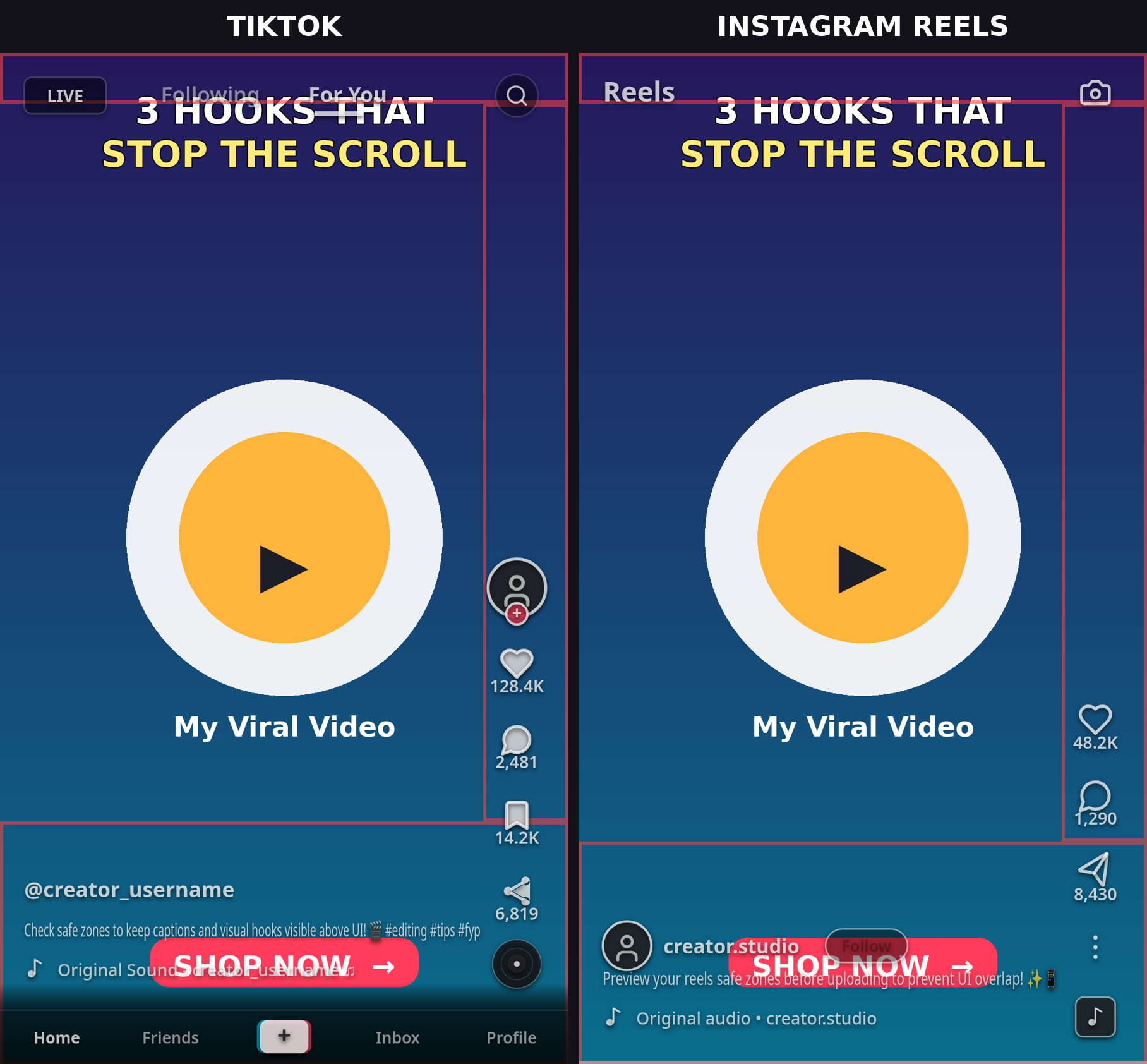
Each platform features a unique interface element that clutters a different portion of the screen:
- TikTok's Caption Bar: Expands dynamically upward as captions grow longer, covering up to 480 px from the bottom edge.
- Instagram's Audio Label & Like Rail: Takes up the bottom-right corner, with clearance zones extending up to ~227 px from the right edge.
- YouTube Shorts' Subscribe Button: A wide red/white button (approx 180×80 px) pinned directly in the bottom-right corner above the channel handle. Any logo, sticker, or watermark placed there is obscured.
Where to Put Text, Faces, and CTAs (the Crosspost Recipe)
Follow this universal placement blueprint when editing your master vertical video:
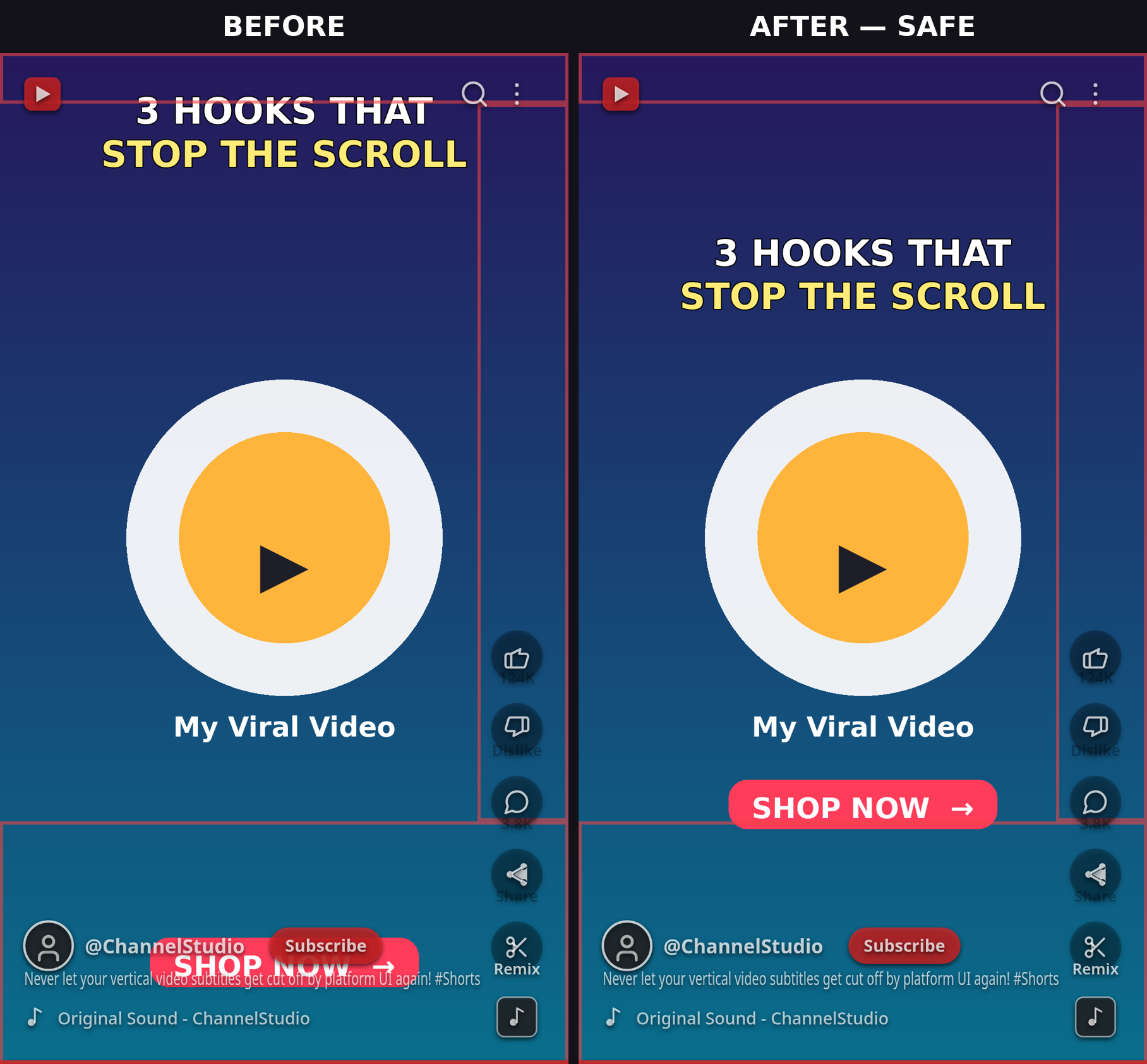
- Opening Hooks / Main Titles: Place between Y 390 and Y 700. This places the hook safely beneath Reels' top header and inside the 4:5 feed crop.
- Subtitles & Kinetic Captions: Center vertically between Y 770 and Y 960 (40%–50% frame height), and ensure each line breaks before X 880 to stay clear of right-hand interaction buttons.
- Speaker Faces & Focal Subjects: Center or align slightly center-left. Never place subjects into the bottom-right corner.
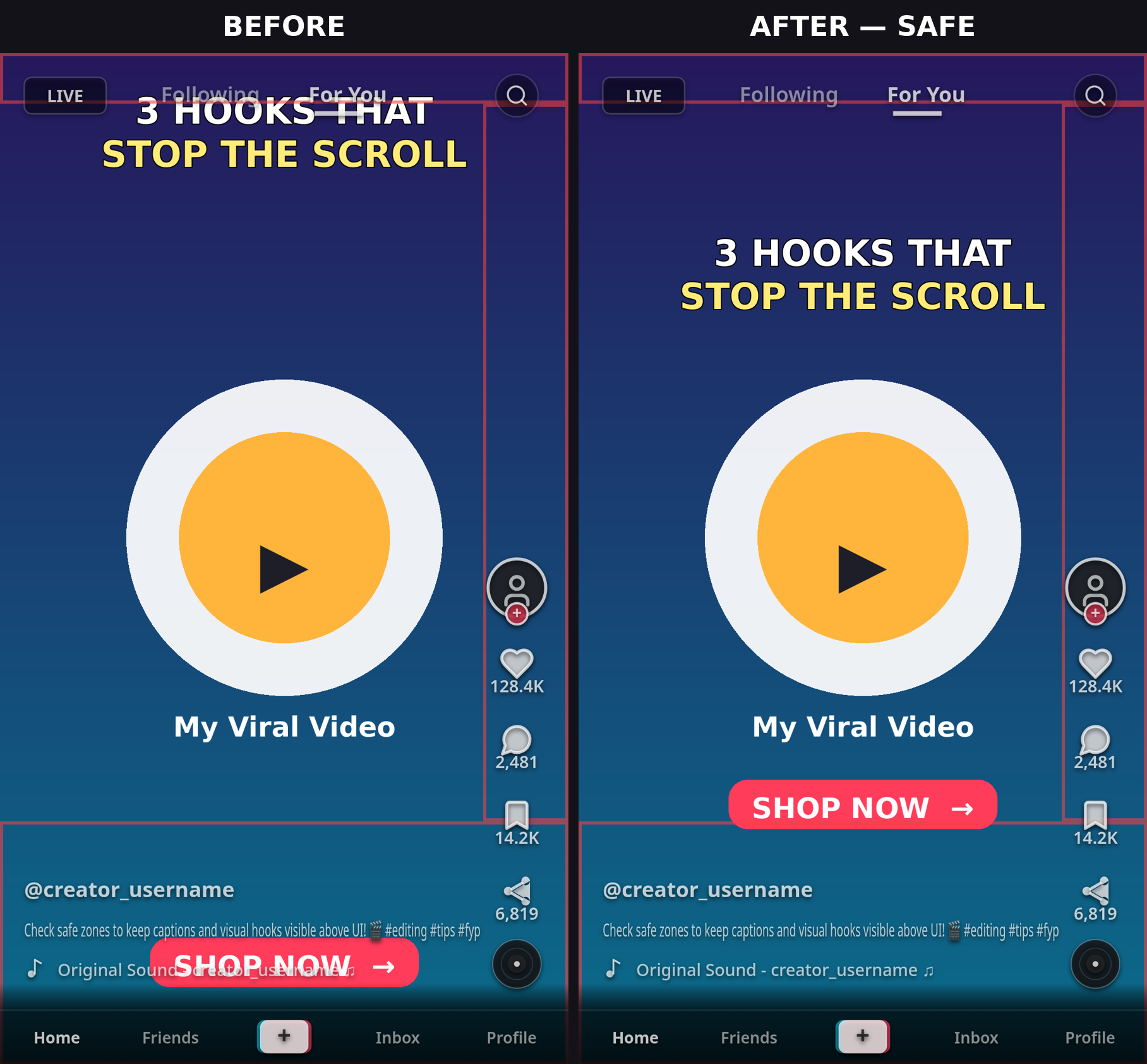
- Primary Call-to-Action (CTA): Place center or center-left above Y 1230. This keeps the CTA visible above TikTok's caption block, above Shorts' subscribe button, and inside Instagram's 4:5 feed crop.
Design Once, Check Three Times
Before scheduling your post in Buffer, Metricool, or native platform schedulers:
- Take a representative freeze-frame or screenshot of your final cut containing your headline and CTA.
- Upload it to ReelGuard.
- Cycle through the platform tabs: TikTok safe zone dimensions, Instagram Reels safe zone dimensions, and YouTube Shorts safe zone dimensions.
- If any text touches a shaded interface box, nudge the layer in your timeline and re-check.
5 Mistakes Crossposters Make
- Assuming TikTok-safe means Reels-safe: Reels reserves significantly more top space (~270 px) than TikTok (~140 px).
- Ignoring the 4:5 Feed Crop: Half of your Instagram views occur in the feed; text at the top or bottom edge gets clipped before full-screen playback.
- Placing CTAs in the bottom-right corner: Overlapped by TikTok sound icons, Reels engagement columns, or Shorts subscribe buttons.
- Burning subtitles into the lower third: Platform caption overlays cover lower-third titles on every network.
- Testing on only one phone: Phone screen aspect ratios vary from 16:9 to 20:9, shifting platform UI margins dynamically.
FAQ
What is the universal safe zone for TikTok, Reels, and Shorts in 2026?
The universal safe zone is the intersection box that remains unobstructed across all three platforms. On a 1080×1920 video, this corresponds to roughly X 80–920 px and Y 390–1230 px (an 840×840 px safe square in the upper-middle frame).
Why does my video look fine on TikTok but gets cut off on Instagram Reels?
Instagram Reels has a taller top header (~270 px vs. TikTok's ~140 px) and crops video to 4:5 (1080×1350) when viewed in the feed. Designing to the universal safe zone prevents this issue.
Where should I place my call to action for crossposting?
Place CTAs center or center-left between Y 1000 and Y 1230. This keeps your CTA clear of TikTok captions, YouTube Shorts subscribe buttons, and Instagram 4:5 crop boundaries.
How can I check my crosspost safe zones for free?
Use ReelGuard. It runs 100% locally in your browser, allowing you to toggle between TikTok, Reels, and Shorts overlays in seconds without uploading any media.